Price Increase Notice Templates and Timing for Online Stores
Who needs a price increase notice, how much to raise, and five copy-ready templates for subscribers, wholesale buyers and shoppers, with real price data.
Two groups should always get a formal price increase notice: subscribers on auto-renewal and wholesale accounts. Both should get a dated notice with the new price and a reason, sent inside the legal or contractual window. One-off retail shoppers usually need no individual notice; the honest move is a short note on the product page and no fake "was" price. Before any of that, size the raise from your new unit cost and your gap to competitors, and decide in advance what result would make you roll it back.
All five templates are in one file: download the price increase notice templates (TXT).
Who needs a price increase notice?
| Customer | Notice? | What triggers it | What to send |
|---|---|---|---|
| Subscribers and auto-renew customers | Always | State law can set the timing; California requires 7 to 30 days before the fee change | Email with new price, date, reason, how to cancel, last and first charge dates |
| Wholesale and B2B accounts | Always, as practice | Your contract or terms may require it; 30 to 90 days is common practice | Letter with a SKU price table, effective date and open-order rule |
| Repeat retail customers | Optional | Goodwill only | Short heads-up, no fake urgency |
| One-off retail shoppers | Usually no individual notice | None we found for one-off purchases; state price-gouging laws can cap increases during a declared emergency | Product-page note and an FAQ entry |
| Open orders and preorders | Honor the checkout price | The price they agreed to when they paid | Nothing, unless you change terms |
One Shopify detail changes the order of work. Changing a product's price does not change what existing subscribers pay. Each line on a Shopify subscription contract stores its own current price, and Shopify's developer docs state that the price of the line item does not update automatically. Subscribers stay on their stored contract price until your subscription app changes it. That gives you a clean window to notify them first.
Step 1: Size the raise from your new costs
Two rules, and they can differ by more than 2x:
- Keep profit per unit: new price = new unit cost + old profit per unit. You earn the same dollars per sale, and any lost volume costs you profit.
- Keep margin %: new price = new unit cost ÷ (old cost ÷ old price). The raise is the same percentage as the cost increase, and you can lose some volume before total profit falls.
Hypothetical example: a 12 oz bag of coffee sells for $24.00. Unit cost (beans, bag, roasting labor, freight) rises from $9.00 to $10.35, up 15%. Old profit per unit is $15.00, and old margin is 62.5%.
| Hypothetical option | New price | Raise | Profit per unit | Break-even unit loss |
|---|---|---|---|---|
| Keep profit per unit | $25.35 | +5.6% | $15.00 | 0% |
| Next whole-dollar step | $26.00 | +8.3% | $15.65 | 4.2% |
| Keep margin % | $27.60 | +15.0% | $17.25 | 13.0% |
The two rules differ by 2.7x in the size of the raise (5.6% against 15%). The last column decides it:
Break-even unit loss = 1 − old profit per unit ÷ new profit per unit
At $26.00 you can sell 4.2% fewer bags and still make the same gross profit as before. At $27.60 you can lose 13.0%. Pick a candidate price, then ask: do I expect to lose more buyers than that? If you do not know, the next two steps show how exposed you are.
If your floor is unclear because shipping, fees and payment costs are tangled into "cost", work it out first with the cost-floor method in how to price dropshipping products.
Download the price increase planner (CSV). It opens in Google Sheets or Excel with the formulas in place: price to keep profit, price to keep margin, planned increase %, break-even unit loss, gap to the lowest competitor after the raise, and a rollback trigger. The hypothetical row above is filled in.
Step 2: Check your headroom against competitors
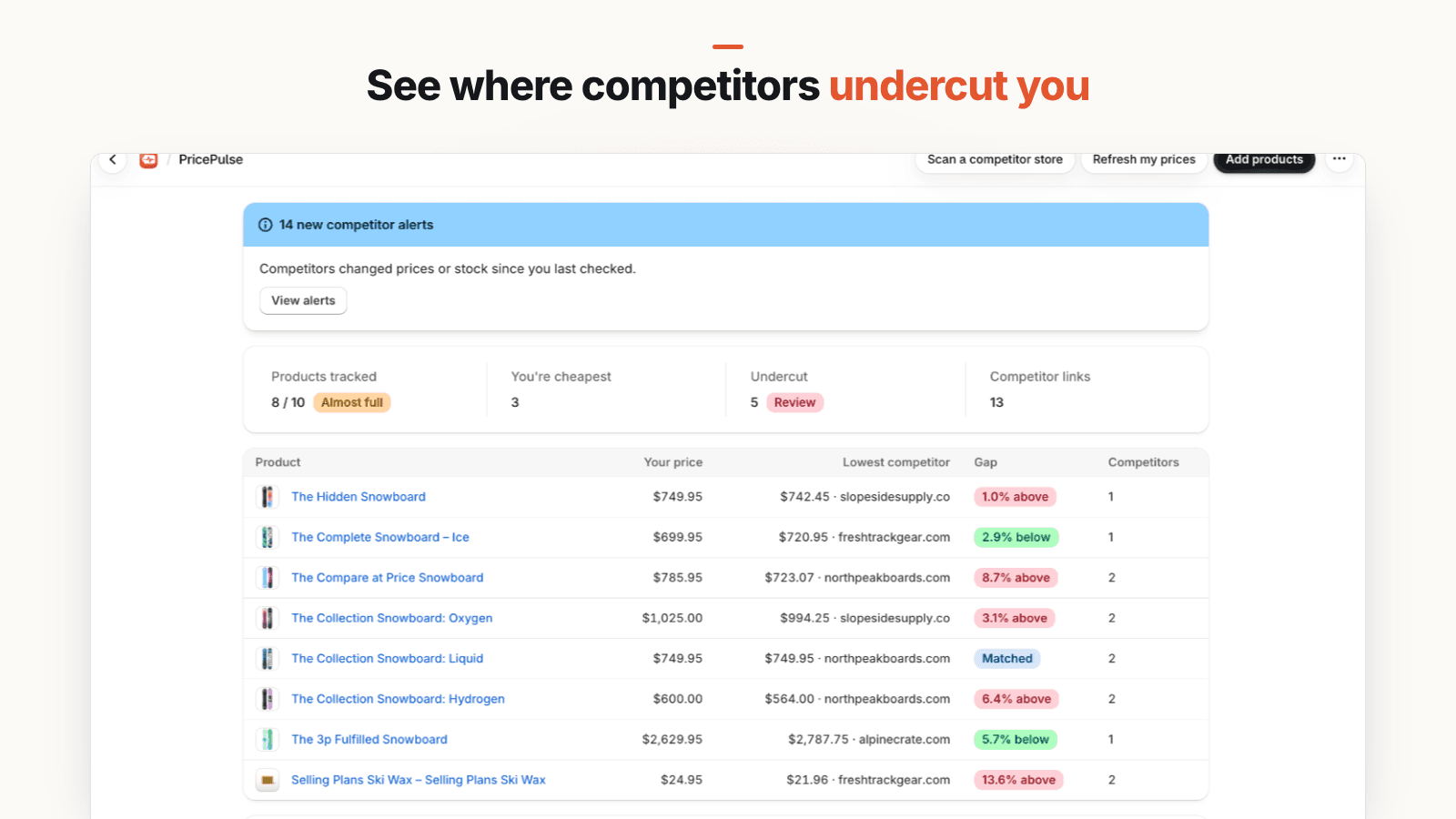
Your costs set the price you need. Competitors set how far you can go before you are the obvious expensive option. For each product you are raising, note your gap to the lowest competitor that has the item in stock, before and after the raise:
Gap % = (your price − lowest in-stock competitor price) ÷ lowest in-stock competitor price × 100
In the planner's hypothetical row, the cheapest in-stock rival charges $25.00. At $24.00 you were 4% below it; at $26.00 you are 4% above it, and no longer the cheapest option. The method for finding the right rivals and matching identical products is in how to monitor competitor prices.
Original data: what 24 coffee roasters charge per ounce
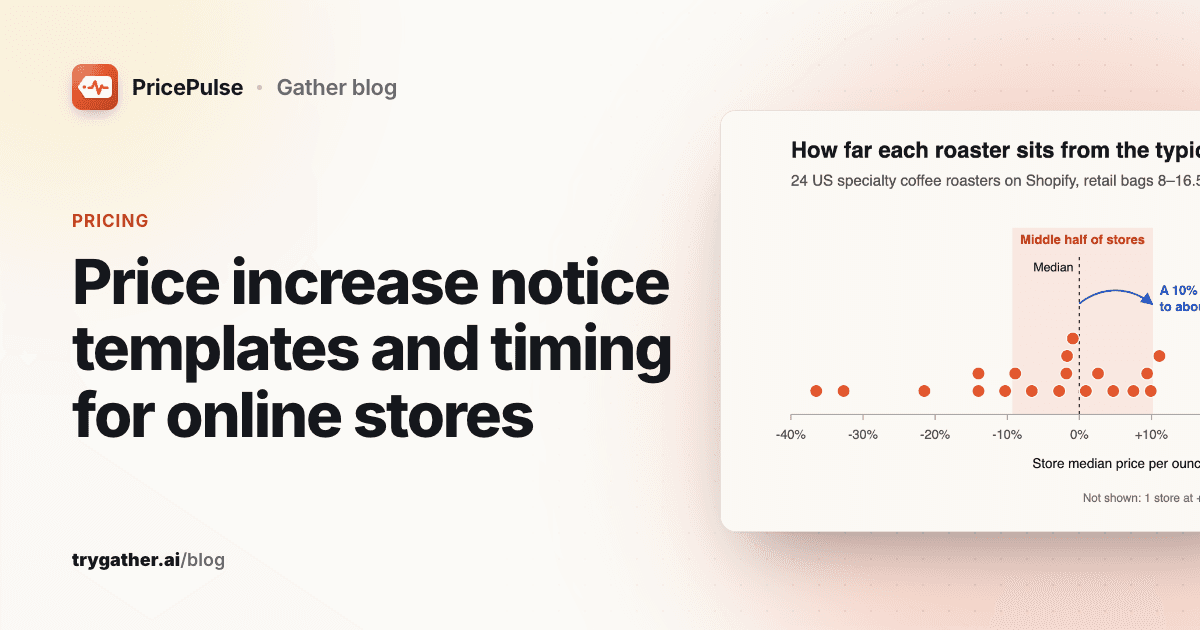
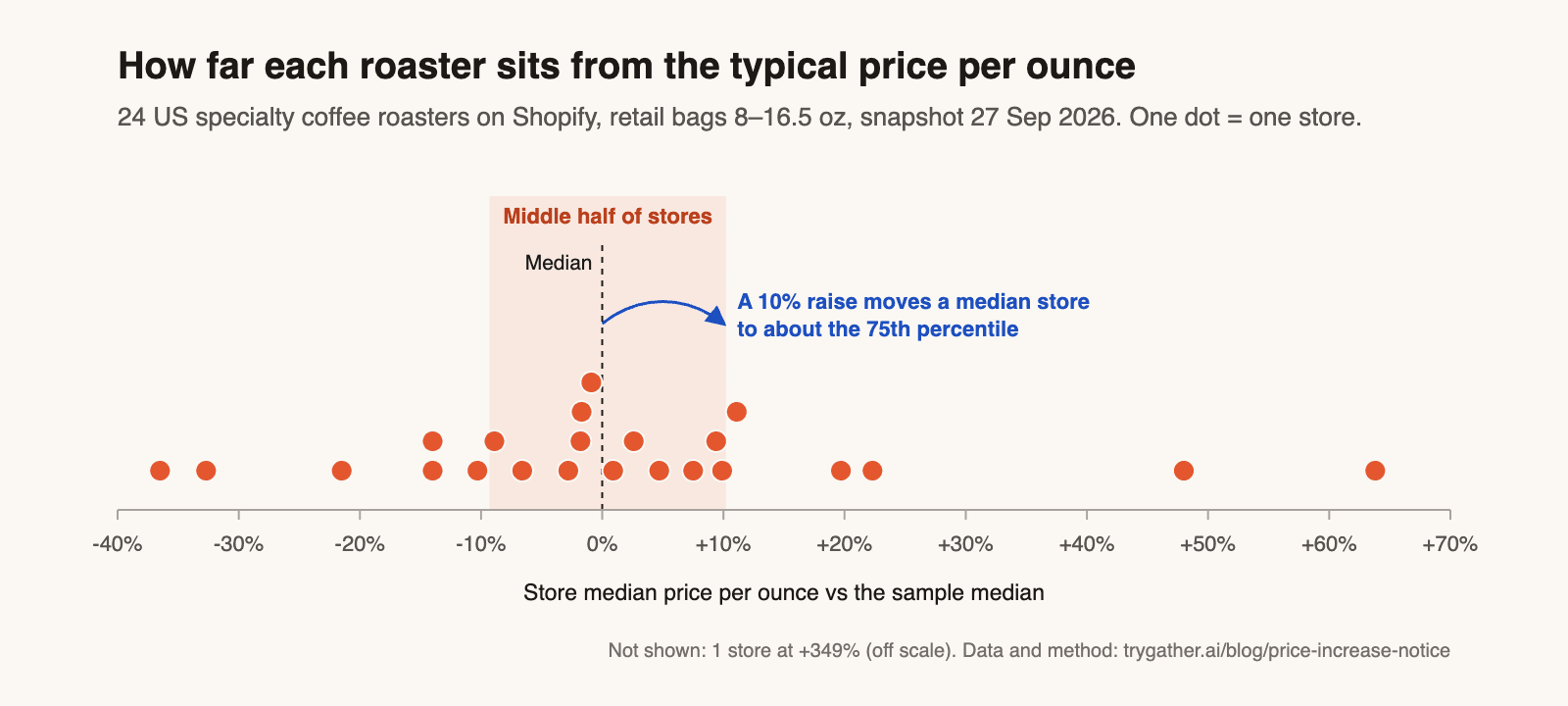
To see how much room a typical store has, we took a snapshot of the public product data that Shopify stores publish at /products.json for 24 US specialty coffee roasters on 27 September 2026. We kept 1,386 retail-bag variants from 8 to 16.5 oz, excluded subscriptions, gifts, merch, equipment, bundles, case packs and wholesale listings, and counted grind options at the same size and price once. Stores are anonymized and reported only in aggregate.
In this sample:
- The median store charges $2.23 per ounce. The middle half of stores sits between $2.02 and $2.46: the 75th-percentile store charges about 22% more per ounce than the 25th. The full range runs from $1.42 to $10.00.
- A median store's 12 oz bag works out to about $26.75. A 10% raise takes it to about $2.45 per ounce, roughly the 75th percentile.
The data covers specialty coffee on Shopify on one day, so check the pattern in your own niche before relying on it. If your category's band is this tight, a 10%+ raise changes where you sit in it, so treat it as a positioning call. Downloads: store summary (CSV), all 1,386 variants (CSV) and the method and headline figures (JSON).
Step 3: Pick the new price point
The price your formula produces is rarely the price to publish. Fit it to the pattern your catalog already uses.
Endings. In the coffee sample, 68.0% of variants end in .00, 10.3% in .50 and 3.6% in .99, and .00 is the most common ending at 19 of 24 stores. A $25.35 bag next to $22.00 and $28.00 bags looks like a mistake. Round to your own pattern: that is how $25.35 became $26.00 in the hypothetical table.
Steps. Within a store, adjacent price points were a median 4.4% apart (store-level middle half: 3.3% to 7.2%). In a catalog like that, a raise is often one step up your own price ladder. Moving a product two steps at once puts it next to products it was never priced against, so check the range page after you edit.
Other levers. Before raising the sticker price, check whether one of these covers part of the cost:
- Subscribe discount. Checking up to four products per store, 18 of 24 roasters offered a subscribe option on at least one, and 13 used a percentage discount. The largest discount per store was 5% at four stores, 10% at five, 15% at one, 20% at two and 30% at one. If your discount is at the high end, trimming it for new subscribers may cover part of the cost increase. Changing it for existing subscribers is a fee change, and it needs the same notice as a price change.
- Size or pack. The main retail bag was under 12 oz at 10 of the 24 roasters (8, 8.82, 10, 10.5 and 10.93 oz), so in this niche a 10 oz bag sits as normally next to peers as a 12 oz one. If you move to a smaller size, change it in the product title, variant name and photos, and tell subscribers the same way you would tell them about a price change.
No compare-at. Only 0.6% of variants in the sample had an active compare-at price, and just 5 of 24 stores had any. Never put the old, lower price in the compare-at field after a raise. On Shopify, a compare-at price is how a sale is shown, and the FTC's guides on former price comparisons treat a "was" price as deceptive unless it was genuinely offered. A lower former price cannot be a discount off a higher new one.
Step 4: Timing, group by group
Work backwards from the effective date. Wholesale buyers need the most time because they have to reprice their own shelves.
| When | Who | What |
|---|---|---|
| 30 to 90 days before, or what the contract says | Wholesale and B2B accounts | Price list with effective date and open-order rule |
| Inside the legal window (California: 7 to 30 days before the change) | Subscribers | Notice with new price, date and how to cancel |
| 1 to 2 weeks before | Repeat retail customers (optional) | Heads-up with a real cut-off date and time for current prices |
| Effective date | Everyone | Update prices, contracts, B2B catalogs, product-page note, FAQ |
| Weeks 1 to 4 after | You | Weekly review against baseline and the rollback trigger |
The 30-to-90-day range is common practice, not law: Shopify's own guide to price increase letters suggests 30 to 60 days for most customers and 90 for B2B contracts and high-value subscriptions. Your wholesale agreement may set a different number, and the contract wins.
The five price increase notice templates
All five are in the templates file. Every one names a reason and a date, because the reason answers the first question people reply with and the date tells them exactly when to act. Here is the subscriber email in full, since it carries the most requirements:
Subject: Your [product] subscription price changes on [date]

Hi [first name],

Starting with your [date] order, your [product, size] subscription will be
[new price] per [delivery interval], up from [old price]. That is
[+$ amount] per delivery.

Why: [one concrete cause, e.g. "our shipping carrier raised its rates on [date]"].

You do not need to do anything to keep your subscription. If you would
rather not continue at the new price, you can:
- Cancel: [exact steps or direct link]
- Skip or change frequency: [link]
- Switch to [cheaper option]: [link]

Your next charge before the change: [date], [old price].
First charge at the new price: [date], [new price].
Why each part is there, across all five templates:
- Subscriber email. The cancel instructions and the two charge dates answer the question every subscriber has ("when does this hit my card, and how do I stop it?"), and California requires cancellation information with a fee-change notice.
- Wholesale letter. The SKU table (old price, new price, % change) lets a buyer update their own retail prices in one pass, and the open-order line prevents a dispute over orders already placed.
- Loyal-customer heads-up. It offers current prices until a real date and time. The "held prices since [date]" line only works if it is true.
- Product-page note. One line near the price. Remove it 30 to 60 days later, once repeat buyers have seen it; a note left up for months reads as an ongoing problem.
- FAQ entries. One each for retail, subscribers and wholesale, so support can paste the same answer every time.
The wholesale price table and the product-page note, as they appear in the file:
[SKU / product]    [old unit price]  ->  [new unit price]   ([+x%])
[SKU / product]    [old unit price]  ->  [new unit price]   ([+x%])
[SKU / product]    [old unit price]  ->  [new unit price]   ([+x%])

Orders placed before [date] ship at current prices.
Price updated [date]: [product] is now [new price]. [Cause in one clause,
e.g. "Our green coffee costs rose [x]% this year."] Subscribers were
emailed on [date]. Questions: [link to FAQ or contact].
Subscription rules we checked (September 2026)
Change-day checklist
- Update product prices with the bulk editor or a CSV import.
- Update subscription contract prices in your subscription app, separately. Until you do, existing subscribers keep paying the old price. Find out how your app does this before you pick the date you announce.
- Update B2B catalog fixed prices. In Shopify B2B catalogs, fixed prices override any overall adjustments, so a changed retail price or a new percentage will not move them.
- Add the product-page note and FAQ entry.
- Leave compare-at empty on every raised product.
The full list with timings and a reason per task is in the price increase checklist (CSV).
After the raise: a 4-week review with a rollback trigger
Set the rollback rule before the change, while you are calm. Deciding after one slow Tuesday is how good raises get reversed.
- Baseline: average weekly units for the four weeks before the raise, per product, plus the product's conversion rate for the same period. If units fall but conversion holds, traffic dropped rather than demand, and that alone is no reason to roll back.
- Trigger: weekly units below baseline × (1 − break-even unit loss) × 0.9, for two consecutive weeks. The 0.9 is a 10% buffer for normal weekly noise. In the hypothetical row, 120 baseline units and a 4.2% break-even loss give a trigger of 103 units.
- Competitor watch: a rival raising its price too is new headroom and a reason to hold. A rival cutting after your raise opens a gap you did not plan on. Treat that as an undercut, using the steps in how to respond to price undercutting. Reversing the whole raise is the wrong tool for one rival's move.
- Decide at week 2 to 4: hold, partial rollback to the next lower step on your ladder, or full rollback. Changing back is also a price change for subscribers, so keep their contracts in step.
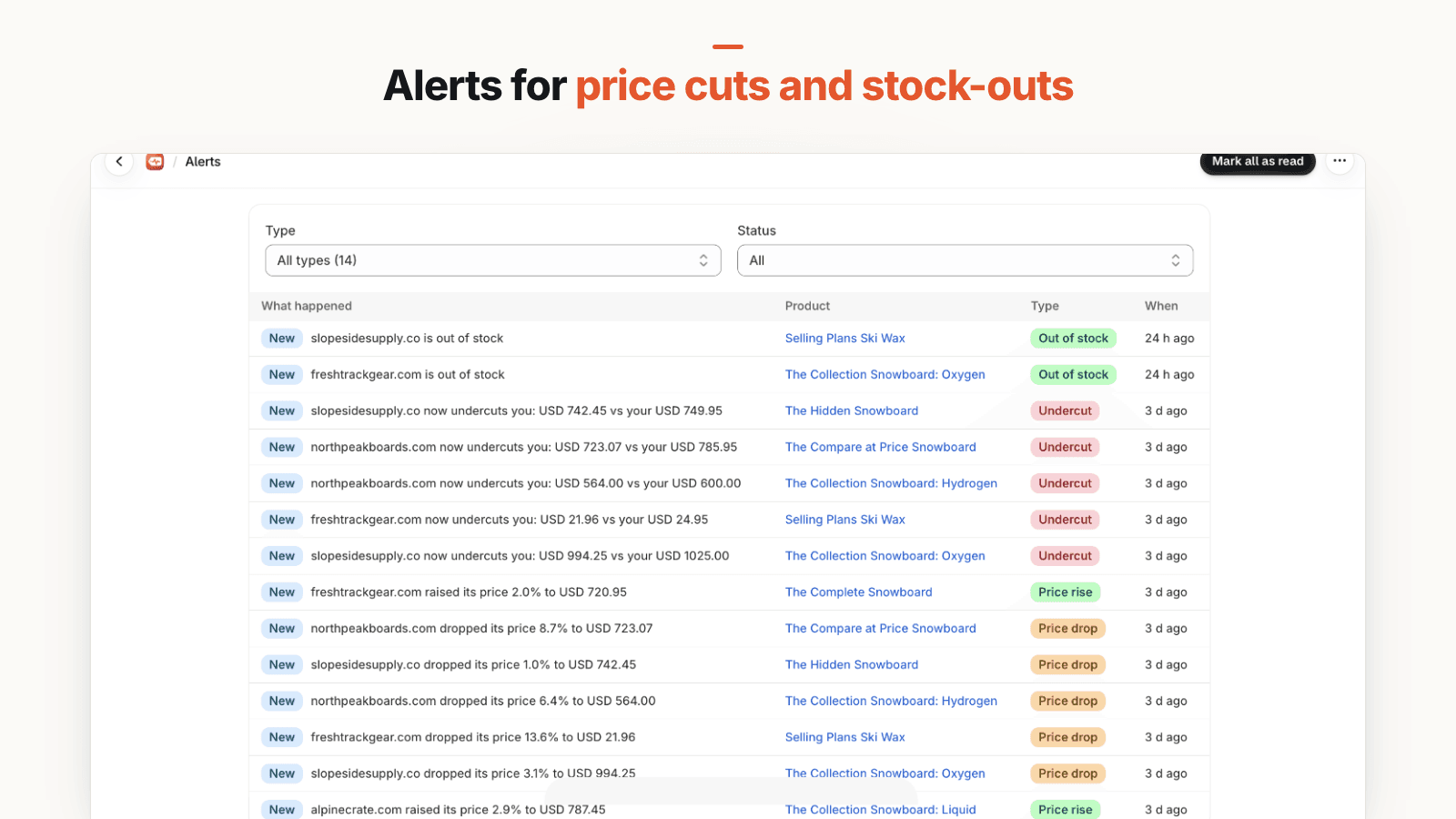
PricePulse, our Shopify app, covers the competitor half of this review: your price against the lowest tracked competitor, price history, and alerts on rises, drops, undercuts and stock changes. It is read-only and does not see your sales, so units and conversion stay in Shopify analytics. It has been submitted to the Shopify App Store and is not listed there yet.
Frequently asked questions
How much notice should I give before a price increase?
It depends on the customer. Subscribers on auto-renewal need notice inside the window set by the laws where they live; California, for example, requires 7 to 30 days before the fee change, with information on how to cancel. Wholesale accounts should get whatever their contract says, and 30 to 90 days is common practice. One-off retail shoppers usually get no individual notice: the new price on the product page is the notice.
Do I have to notify customers of a price increase?
For subscription and auto-renew customers, often yes: California requires advance notice of a fee change on an existing automatic renewal, and other states and countries have their own rules. Wholesale contracts frequently require it too. For one-off retail purchases we found no general US rule requiring individual notice, because the shopper sees the price before paying. The main exception to know about is price-gouging law: many US states cap increases on some goods during a declared emergency (California, for example, limits many consumer goods to 10% above the pre-emergency price). This is not legal advice; check the rules where your customers live.
How do I word a price increase notice?
State the product, the old and new price, the date it takes effect and one concrete reason, in the first two sentences. For subscribers, add the last charge at the old price, the first charge at the new price and exactly how to cancel, skip or switch. Leave out apologies that run for a paragraph and deadlines that are not real.
Can I show the old price as a sale price after raising it?
No. A compare-at or strikethrough price tells shoppers they are getting a discount. After a raise, the old price was lower than the new one, so showing it as a 'was' price is misleading. Use a short, dated note near the price instead.