How to Monitor Competitor Prices: A Shopify Playbook
A step-by-step competitor price monitoring playbook for Shopify stores: pick rivals, match exact variants, set a check cadence and act on real price gaps.
Competitor price monitoring means checking what other stores charge for the same products you sell, on a regular schedule, so you can see when you are overpriced, when you have room to raise a price, and when a rival has run out of stock. For a small Shopify store, a good process fits in one table: your price next to the lowest competitor's price, with the percentage gap, refreshed often enough to catch the moves that matter.
This playbook walks through that process in seven steps, starting with a spreadsheet you can download and ending with how to automate it. It is written for stores with dozens to a few hundred products, not for enterprise repricing teams.
Why competitor prices matter more to small stores
A large retailer can win on selection, loyalty programs, free returns and brand recognition, so a price that is a little high on one item rarely decides the sale. A small store usually sells a narrower range of products that shoppers can find elsewhere with a single search. When your product page is one of several tabs a shopper has open, the price difference is often the most visible thing separating you.
That cuts both ways. You lose sales quietly when a competitor drops below you and you do not notice for weeks. You also lose margin when you discount out of fear while the competitor was actually out of stock, or more expensive once shipping was added. Monitoring is how you replace guesses in both directions with facts.
Step 1: Pick the competitors that actually take your sales
You do not need to watch every store on the internet. You need the handful that a shopper comparing your product is likely to see. For each important product, look in these places:
- Google search and Google Shopping. Search the exact product name, model number or GTIN the way a shopper would. The stores that show up on the first page are your real comparison set.
- Your Google Merchant Center data. If you run Shopping listings, the pricing section of Merchant Center analytics compares your prices with a benchmark built from other retailers selling products with the same GTIN. It will not name the stores, but it tells you which products to look at first.
- Marketplaces. If your product is on Amazon, eBay or a regional marketplace, shoppers check there. Include the listing sold by the brand or its main distributor.
- Other stores selling the same brand. Brand "where to buy" pages and other Shopify stores carrying the same supplier's products are often your closest competitors.
- Your customers. Messages like "I saw this cheaper at..." tell you exactly which store a shopper was comparing you to.
Keep the list short: three to five competitors per product. Past that, you spend more time collecting numbers than using them.
Prioritize products the same way. Start with your top sellers and anything sold under an identical name or model number elsewhere. Products that only you sell, or that you have bundled or customized, need a different kind of research (positioning, not price matching).
Step 2: Match the identical product, not a lookalike
Most bad pricing decisions come from bad matches. A competitor charging less for "the same kettle" is not useful information if their kettle is the 0.6-litre version and yours is the 1-litre one. Before you record a single price, confirm that the listing is the same:
- Variant: size, colour, capacity, material. On Shopify stores, select the variant on the competitor's page first; the URL usually gains a
?variant=parameter, and that link points at that specific variant. - Pack size and quantity: a 3-pack against a single unit, or 100 filters against 200.
- Bundle contents: a "starter kit" that includes accessories is not the same offer as the bare product.
- Condition and version: new vs refurbished, current model year vs last year's.
- Seller: on marketplaces, the brand's own listing and a third-party reseller can have different prices and stock on the same page.
If the product is similar but not identical, either leave it out or write down the difference in a notes column so nobody compares the two numbers blindly later.
Step 3: Decide what to record
A price on its own can mislead. These are the fields worth capturing for each competitor listing:
| Field | Why it matters |
|---|---|
| Current price | The number the shopper sees first. |
| Compare-at or "was" price | Shows that a sale is running, which is often temporary. |
| Stock status | An out-of-stock competitor is not competing for today's order. |
| Shipping to your main market | A lower sticker price can be the higher delivered price. |
| Exact variant or pack matched | Keeps comparisons like-for-like over time. |
| Date checked | Tells you how old the number is, and lets you spot patterns. |
A note on sale prices: on Shopify, a sale is usually shown by setting a compare-at price higher than the selling price. If you respond to a competitor's sale with one of your own, be careful with the "was" price you show. In the US, the FTC's guides on former price comparisons expect the "was" price to be one you actually offered openly for a reasonably substantial period, and treat an inflated or rarely used one as deceptive.
Step 4: Set a check cadence by how fast your category moves
Checking too rarely means you find out about a price cut from a slow sales week. Checking too often wastes time on numbers that never change. Match the cadence to the category:
| Category behaviour | Suggested cadence |
|---|---|
| Stable, specialist or handmade products; prices change a few times a year | Weekly |
| Competitive categories with regular promotions and several stores selling the same brands | Daily |
| Products sold on marketplaces where sellers use automated repricing tools | Twice a day or more |
Treat the table as a starting point, then adjust using your own data. Log checks for three or four weeks and count how many actually showed a change. If a weekly check almost never finds anything, it is fine. If nearly every daily check shows a different price, step up. Also check more often around the times your competitors run sales, such as seasonal events and product launches.
The workload grows faster than it looks: 20 products with 3 competitors each is 60 page visits per round. Daily, that is 60 visits every day. That arithmetic is usually what pushes stores from manual checks towards automation.
Step 5: Build the price-gap view
This is the one view that turns raw prices into something you can act on. For each product, compare your price with the lowest competitor that has the item in stock and express the difference as a percentage of the competitor's price:
Gap % = (your price − lowest competitor price) ÷ lowest competitor price × 100
A positive gap means you are more expensive; a negative gap means you are cheaper. Here is a worked example with made-up numbers, using delivered prices (price plus shipping):
| Product (example data) | You, delivered | Lowest competitor, delivered | Gap | Read |
|---|---|---|---|---|
| Pour-over kettle, 1 L | 64.00 | 61.50 (Competitor B) | +4.1% | Worth a look |
| Paper filters, 100-pack | 8.20 | 7.99 (Competitor A) | +2.6% | Inside a 3% gap tolerance: hold |
| Gooseneck kettle, 0.6 L | 45.00 | 49.00 (Competitor A) | −8.2% | Cheapest: room to review margin |
The first row shows why the fields in step 3 matter. By sticker price alone, Competitor C looked cheapest at 58.00, which would put you 10.3% above. But C was out of stock and charged 7.50 shipping, so the delivered price was 65.50. The real gap was 4.1%, against a competitor that could actually ship.
Download the free competitor price tracking template (CSV). It opens in Google Sheets or Excel and already contains the delivered-price, lowest in-stock competitor, gap and signal formulas for three competitors per product (out-of-stock competitors marked N are left out of the lowest price), filled in with the example rows above. Replace the example rows with your own products.
Step 6: Set thresholds so small changes don't trigger reactions
Without thresholds, every 20-cent move becomes a decision, and you end up nudging prices constantly for no gain. Set three rules before you start reacting:
- A minimum change worth noticing. Pick a percentage below which a competitor's price move is ignored. On a 30.00 product, a 1% threshold ignores anything under 0.30; a 3% threshold ignores anything under 0.90. Lower-margin products usually need a lower threshold, because a small gap eats a bigger share of your profit.
- A gap tolerance. Separately, decide how far above the lowest in-stock competitor you are willing to sit before you review a price, for example 3%. This is the "Gap tolerance %" column in the template and the "hold" line in the table above. The minimum change filters out small moves in a competitor's price; the gap tolerance decides whether the resulting gap needs action.
- A persistence rule. Only act when a gap shows up on two consecutive checks. Flash sales, pricing errors and one-day promotions often reverse on their own, and matching them can leave you cheaper than everyone once they end.
Stock changes are the exception. A competitor going out of stock, or coming back, is worth knowing the moment it happens, whatever the price.
Step 7: Turn the data into decisions
A gap is a question, not an instruction. Use a simple decision table:
| What you see | Usually the right move |
|---|---|
| Gap inside your gap tolerance | Hold. Nothing to do. |
| You are above, the competitor is in stock, and the gap persists | Review: match if margin allows, or strengthen the offer (faster shipping, bundle, warranty) instead of cutting price. |
| You are above, but the cheapest competitor is out of stock | Hold, and watch for the restock. You are the in-stock option. |
| You are well below everyone | Check whether you can raise the price without leaving the pack. |
| A competitor keeps dropping below you | Treat it as undercutting and follow a deliberate playbook rather than a price war. See how to respond to price undercutting. |
Two constraints come before any of this. First, your floor: know the lowest price at which each product still makes money after product cost, fees and shipping. The guide to pricing dropshipping products walks through that calculation. Second, brand rules: if a brand you stock has a minimum advertised price policy, the advertised price you can respond with is limited. The MAP pricing guide covers what that means in practice.
Competitor price monitoring: manual vs spreadsheet vs automated
Each approach works at a different size. None is free: manual methods cost time, tools cost money.
| Approach | Works well for | Trade-offs |
|---|---|---|
| Manual checks (bookmarks, notes) | Under about 10 products, stable categories | No history, easy to skip a week, and hard to spot patterns. |
| Spreadsheet (the template above) | Up to a few dozen products with weekly checks | Full control and free, but every number is typed by hand. Time grows with products × competitors × checks. |
| Automated tracker | Larger catalogs, daily or faster cadence, or when stock alerts matter | Costs a subscription, and some retailer sites are harder to read reliably. You still need to confirm matches. |
Automated trackers themselves come in two broad kinds. Shopify apps install into your store admin and read your own prices from it, which keeps setup short for a single store. Standalone price monitoring platforms such as Prisync and Price2Spy work across several ecommerce platforms and sales channels and also offer repricing features, which suits teams managing larger catalogs or several channels. Which kind fits depends on catalog size, how many channels you sell on, and whether you want the tool to change prices or only report them.
A good rule: stay manual until keeping the spreadsheet current becomes the task you skip. A stale spreadsheet is worse than none, because it gives you confidence in old numbers.
How PricePulse automates this (read-only)
PricePulse is our Shopify app for the automated step. It is new: it has been submitted to the Shopify App Store and is not listed there yet. It follows the same process as this playbook:
- Matching: you paste a competitor's product link, or enter a competitor's Shopify store and pick the matching item from its catalog, so a person confirms every match. On Shopify stores, a link that includes
?variant=is read for that exact variant. For products with several sizes or colours, paste the competitor link with?variant=instead of using store search, which picks the product rather than a specific variant. - Recording: each check saves the competitor's price and stock status to price history. It works with Shopify stores and most online shops; Amazon tracking is on the Pro plan.
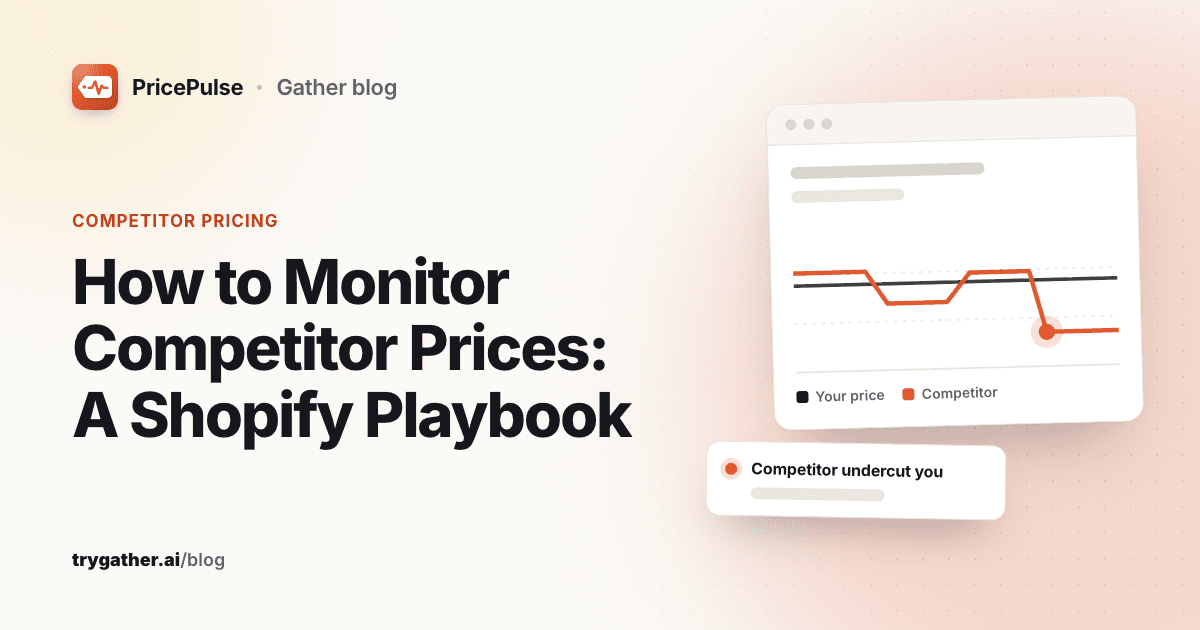
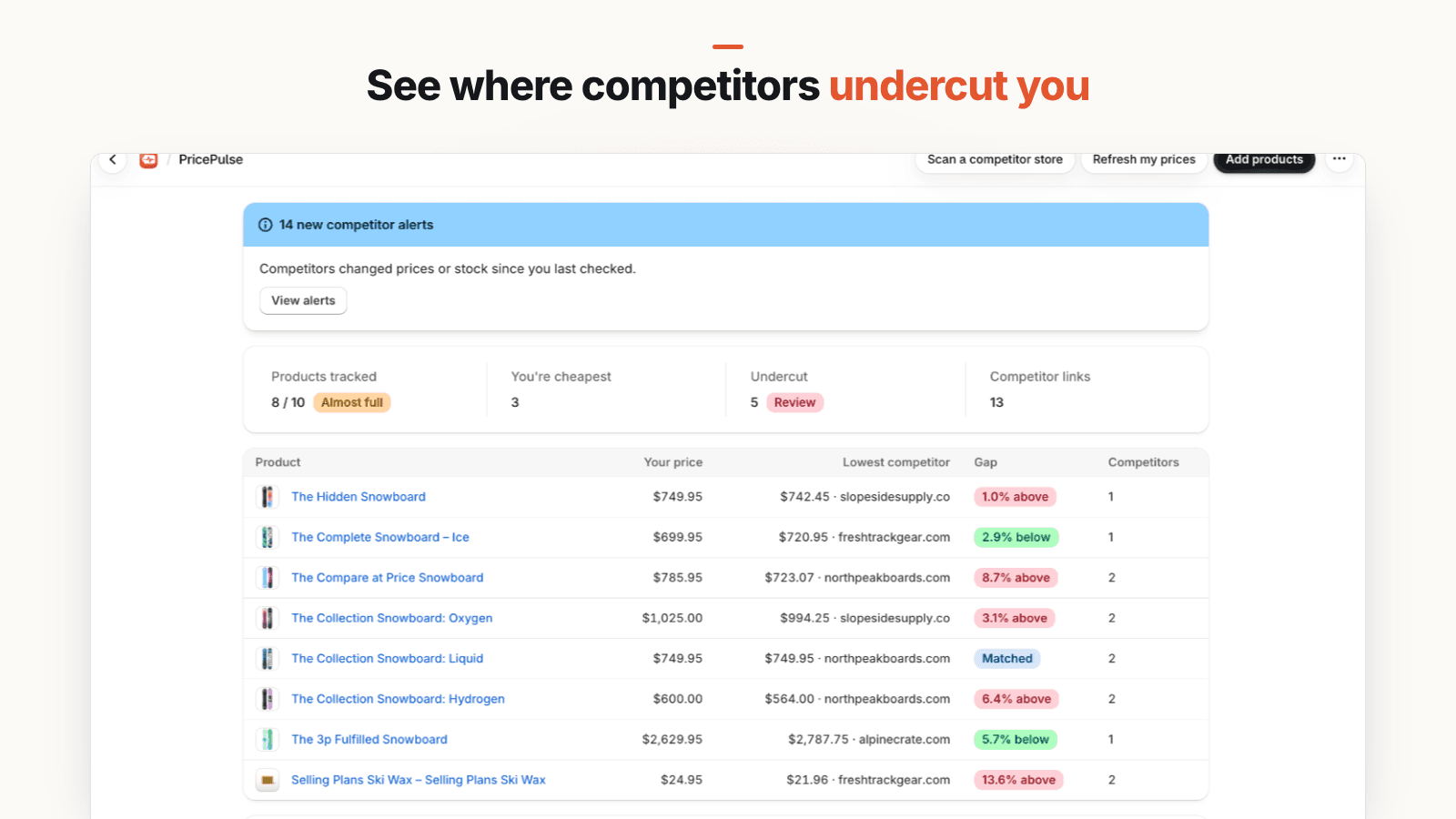
- The price-gap view: your price next to the lowest competitor, with the gap in percent, as in the screenshot above.
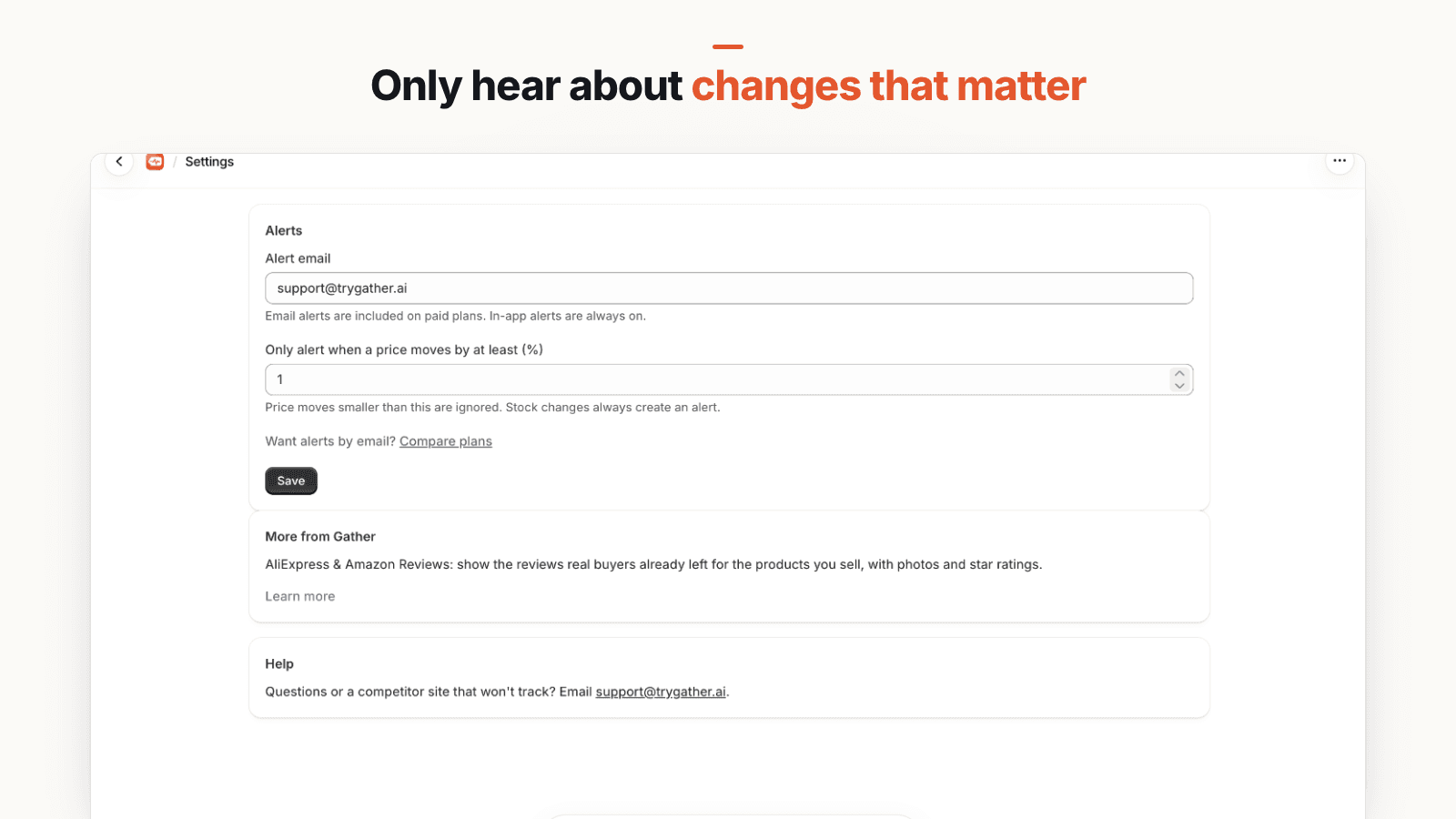
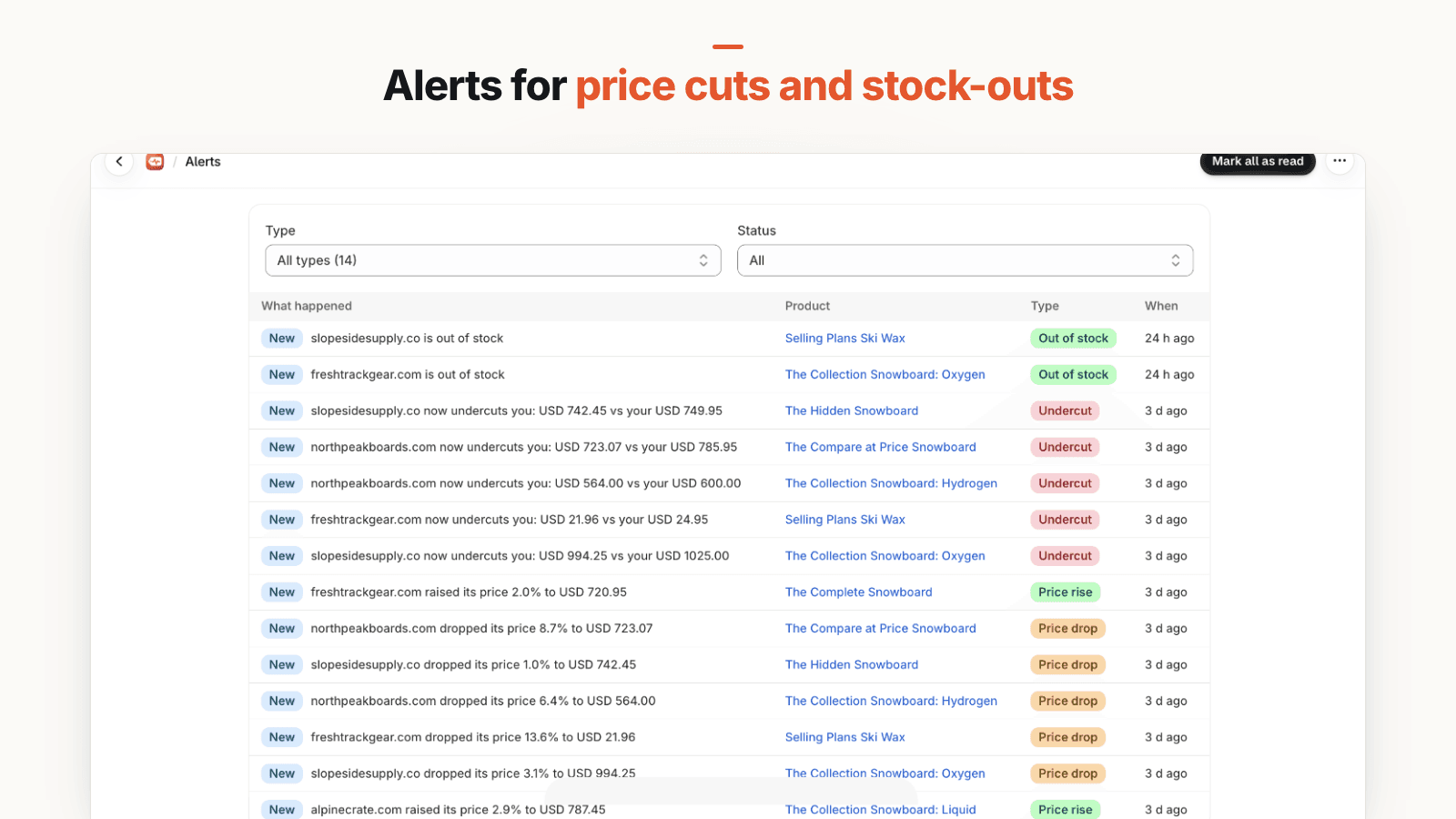
- Thresholds and alerts: you set the minimum percentage change in a competitor's price between checks (the first rule in step 6); smaller moves are ignored. You get alerts for price drops and rises, when a competitor's price drops below yours, and for out-of-stock and back-in-stock, in the app on every plan and as email digests on paid plans.
- Read-only: it never changes your prices. Deciding what to do stays with you.
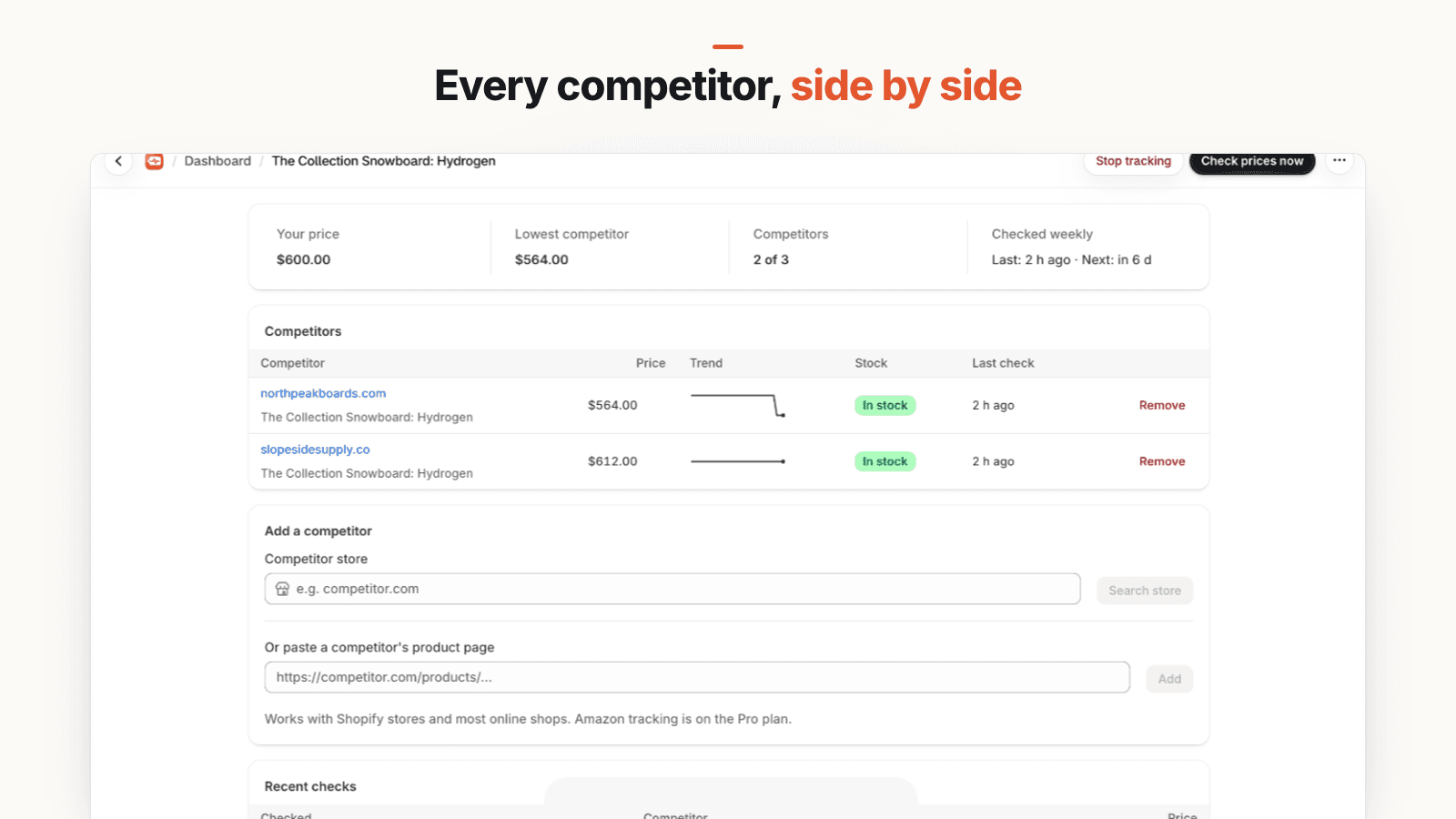
Know the limits. It records the current selling price and stock status, not shipping or compare-at prices, so keep a note for competitors whose shipping differs a lot from yours. The lowest-competitor figure uses the lowest tracked price even if that competitor is out of stock, so check stock on the product's page before acting. And the first check on a new competitor is a baseline, so alerts start from the second check.
The free plan covers 10 products with up to 3 competitors each, checked weekly. Paid plans check daily, every 12 hours or every 6 hours.
If you would rather stay with a spreadsheet for now, that is a sensible choice for a small catalog. The steps are the same either way: the right competitors, identical matches, the fields that matter, a cadence that fits, one gap view, and thresholds that keep you from reacting to noise.
Frequently asked questions
What is competitor price monitoring?
Competitor price monitoring is checking, on a regular schedule, what other stores charge for the identical products you sell, along with their stock and shipping. You compare your price with the lowest competitor as a percentage gap, so you can see when you are overpriced, when you have room to raise a price, and when a rival has run out of stock.
How do I analyze competitor pricing for my Shopify store?
Start with the 10 to 30 products that drive most of your revenue. For each, find the 3 to 5 stores that sell the identical item (same variant and pack size), record their price, sale price, stock status and shipping, then compare your delivered price with the lowest in-stock competitor as a percentage gap. Only act on gaps larger than a tolerance you set in advance and that persist across more than one check.
How often should I check competitor prices?
Match the cadence to how often prices in your category actually move. Weekly is enough for stable, specialist products; daily suits competitive categories with frequent promotions; twice a day or more is only worth it for products sold on marketplaces where sellers use automated repricing. Log a few weeks of checks first and adjust based on how often you see real changes.
What should I track when monitoring competitors' prices?
For each competitor listing, record the current price, any compare-at or 'was' price, stock status, shipping cost to your main market, and the date of the check. Also note the exact variant or pack size you matched, so you are never comparing a single unit against a multipack.
Is it legal to monitor competitor prices?
Looking at the prices a store publicly shows to every shopper is ordinary market research. What you do with the information still matters: follow any minimum advertised price agreements you have signed with brands, respect each site's terms, and never advertise a fake 'was' price when you respond with a sale of your own.
Should I include shipping when comparing competitor prices?
Yes, when shipping differs between stores. Shoppers pay the delivered price, so a competitor with a lower sticker price and a high shipping charge can end up more expensive than you. Compare price plus shipping to your main market, and note free-shipping thresholds that change the picture for larger orders.
Can I monitor competitor prices on Shopify for free?
Yes. A spreadsheet and a weekly calendar reminder cost nothing and work well for a handful of products. Some tracking apps also have free plans for a small catalog; PricePulse's free plan covers 10 products with up to 3 competitors each, checked weekly.