How to Get Customer Reviews for Your Shopify Store
How to get customer reviews on Shopify: time requests to delivery, use 3 copy-ready templates, get photo reviews, and offer incentives the FTC allows.
If you want to know how to get customer reviews for a Shopify store, the short answer is: ask every buyer, a few days after their order is delivered, with a short message that links straight to a review form for the exact product they bought. Make photo uploads a one-tap step, send one reminder at most, and never reward or filter for positive reviews. Everything else in this guide is about doing those things well.
Most advice on this topic is written for restaurants and service businesses chasing Google reviews. Product reviews in ecommerce work differently. The buyer has to receive the item and use it before they have an opinion, and the review lives on your product page, not on a map listing. This playbook covers the ecommerce version: timing, channels, three request templates you can copy, photo reviews, what the FTC allows for incentives, how to answer bad reviews, and what to show while you have none yet.
How to get customer reviews: time requests to delivery, not the order
A common mistake is sending the review request a fixed number of days after the order. If you dropship with 10 to 20 day transit, a "7 days after purchase" email lands before the parcel does. At best it is ignored. At worst it gets a one-star review about shipping.
The better trigger is delivery. On Shopify, the delivered status comes from carrier tracking. Shopify's own Out for delivery and Delivered notifications are sent when a tracking event with that status comes back from the carrier or fulfillment app, and Shopify notes that tracking sources, accuracy and timing vary by carrier.
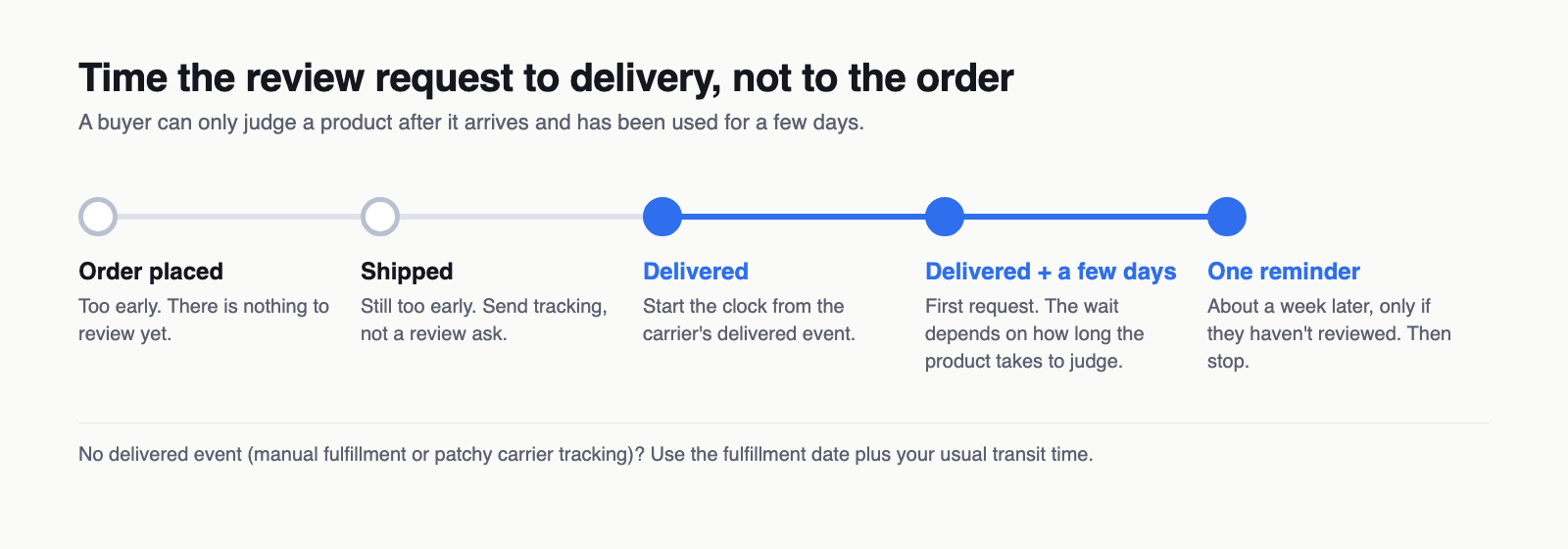
How long after delivery depends on how long the product takes to judge:
| Product type | What the buyer needs to judge it | Suggested first ask |
|---|---|---|
| Accessories, decor, phone cases, prints | Seeing and handling it | 3 to 5 days after delivery |
| Apparel and shoes | Wearing it a few times, maybe one wash | 7 to 10 days after delivery |
| Gadgets and small electronics | Setting it up and using it for a week | 7 to 14 days after delivery |
| Skincare, supplements, haircare | Weeks of regular use | 14 to 21 days after delivery |
| Gifts | Giving it away first | 10 to 14 days, and ask about the recipient's reaction |
These are starting points, not benchmarks. Test them against your own data (see the measurement section below).
Two practical ways to trigger on delivery:
- Use your review app's scheduling. Dedicated review platforms handle this. Judge.me, for example, can schedule requests after an order is marked Delivered and fall back to a set time after fulfillment when Shopify never marks the order as delivered.
- Use Shopify Flow. The Fulfillment event created trigger fires on updates such as in transit or delivered from third-party fulfillment services. Manual fulfillment events do not start it, so manual fulfillers need the Order fulfilled trigger plus a wait long enough to cover transit. Flow decides when, but it does not write or send a review request by itself. The workflow has to hand off to something that does: for example, add an order or customer tag that your review app, Klaviyo flow or Shopify Messaging automation listens for, or call a connector action your review app provides.
Whichever route you pick, keep a fallback. Some orders never get a clean delivered scan, and those buyers still deserve an ask.
Where to ask: email, SMS, packaging and the thank-you page
Each channel reaches the buyer at a different moment. Use more than one, but do not send the same ask in all of them on the same day.
| Channel | When it reaches the buyer | Strength | Watch out for |
|---|---|---|---|
| Post-purchase email | After delivery, on your schedule | Can link straight to the product's review form | Needs a clean subject line and one clear button |
| SMS | Same moment as email, higher visibility | Short and hard to miss | Only text buyers who agreed to receive texts from you, and check local rules |
| Packaging insert | The moment the box is opened | Physical, and it arrives with the product | Keep it a neutral ask. A card that offers a reward for 5 stars breaks the rules below |
| Thank-you / order status page | Right after checkout | Good for setting expectations ("we'll ask how it went") | Too early to ask for a review of the product itself |
| Support replies | After a solved problem | The buyer is already talking to you | Ask everyone you help, not only the happy ones |
A simple setup that works for most small stores: a line on the thank-you page that says you will ask for feedback after delivery, an insert card with a short URL or QR code, and one delivery-timed email with a single reminder.
How to get reviews on Shopify: the store-specific touchpoints
The channels above work for any online shop. On Shopify, a few built-in places are worth wiring up as well, because they reach buyers who already trust the store:
| Shopify touchpoint | What to put there | Setup notes |
|---|---|---|
| Thank you and Order status pages | A short note that you will ask for feedback after delivery, and a support link | Customize these in the checkout and accounts editor with app blocks. Shopify has retired the old Additional scripts box on these pages, so older tutorials that paste code there no longer apply |
| Shipping and delivery notifications | A line saying a short review request will follow | Edit the templates under Settings > Notifications. Keep the review ask itself for later, once the buyer has used the product |
| Shopify Messaging automations | A delivery-timed review request with a direct link | Shopify Messaging (formerly Shopify Email) includes a Post-purchase automation template you can edit. Check its trigger and wait step so it lands after delivery, and check which customers it is allowed to email |
| Customer account order page | A "Write a review" link next to each past order | Some review apps add this through a customer account extension. Check whether yours does before building anything custom |
| Your review app's request flow | The main request and one reminder | Usually the most reliable option, because the app knows which products were ordered and who has already reviewed |
Pick one system to own the actual request and reminder. If both your review app and a Messaging automation send asks, buyers get duplicates.
Review request templates (3 copy-ready examples)
Good review request emails share four traits. They name the exact product. They say how long it takes. They link directly to the review form, ideally with the star rating in the email itself. And they make it clear that honest feedback is welcome, including criticism.
Replace the bracketed parts with your own details. If your review app supports merge fields, use those instead of typing names by hand.
Template 1: The first review request email
Subject: How is your [product name] working out?
Hi [first name],
Your [product name] arrived a few days ago, so we wanted to ask how it's going.
Would you leave a short review? It takes about a minute, and it helps other shoppers decide whether it's right for them. Good or bad, we read every one.
[Rate it: ★ ★ ★ ★ ★]
If something isn't right, just reply to this email and we'll sort it out.
[Your name], [store name]
Many email tools cannot render clickable stars inside the message. If yours can't, use this plain-text version with a single button or link instead:
Subject: How is your [product name] working out?
Hi [first name],
Your [product name] arrived a few days ago. Would you tell other shoppers what you think? It takes about a minute, and honest reviews, good or bad, are what we're after.
[Write a review: link to the product's review form]
Something not right? Reply to this email and we'll help.
[Your name], [store name]
The reply line matters. A buyer with a problem gets a direct route to you, and you still invite everyone to review. Do not replace the review link with the reply option for unhappy buyers. That is review gating, covered below.
Template 2: The SMS request
[Store name]: Hi [first name], your [product name] was delivered recently. How is it? A quick review helps other shoppers: [short link]. Reply STOP to opt out.
Keep it under 160 characters where you can, send it at a sensible local time, and include the opt-out text your SMS tool requires.
Template 3: The reminder (one only)
Subject: Quick question about your [product name]
Hi [first name],
Just one follow-up, and then we'll leave you be. If you have a minute, we'd value your honest opinion of your [product name]. A photo of it in use is especially helpful for other shoppers.
[Write a review]
Thanks either way, [Your name]
Send it about a week after the first request, and suppress it for anyone who has already reviewed or has an open support ticket about the order. "And then we'll leave you be" is a promise, so keep it.
Getting photo reviews: make upload easy and ask specific questions
Photo reviews answer the question text cannot: what does it actually look like in a real home, on a real person, next to a real phone? Buyers rarely add photos unless you make it easy and give them a reason.
What helps:
- Put the upload on the same screen as the stars. Every extra page between "rate it" and "add a photo" loses people. Choose a review form that accepts photos straight from a phone camera roll.
- Ask for a specific shot. "Add a photo" is vague. "Show it on your desk" or "a photo of the fit from the side" gives the buyer something to do.
- Ask specific questions in the form. Prompts such as "How was the sizing?" or "How long did the battery last?" produce more useful reviews than an empty text box.
- Say how photos are used. Tell buyers their photo will appear with their review on the product page, and let them choose how their name is shown.
- Show existing photo reviews in the request. When a buyer sees other customers' photos, the request reads as normal rather than as an unusual favor.
What counts as a "specific shot" depends on what you sell:
| Vertical | Photo prompt to use | Why shoppers want it |
|---|---|---|
| Apparel | "A photo of the fit from the side, and your usual size" | Shows fit and drape that a flat product shot can't |
| Home decor | "Show it in the room where you put it" | Shows real scale and how the color looks in normal light |
| Jewelry and accessories | "A photo of it being worn, in daylight" | Shows actual size and finish |
| Phone cases and tech accessories | "Show it on your device, including the edges" | Shows fit around buttons and cameras |
| Beauty and skincare | "A swatch or the texture on your hand" | Shows shade and consistency (skip before-and-after prompts, which invite health claims) |
If you offer anything for a photo review, the same rules apply as for any incentive: it must be for an honest photo review, whatever the rating.
Incentives the FTC allows and the ones it doesn't
This is where well-meant review programs go wrong. The US Federal Trade Commission's final rule on fake reviews, announced on August 14, 2024, prohibits businesses from offering compensation or other incentives conditioned on reviews expressing a particular sentiment, positive or negative. The FTC's guide, Soliciting and Paying for Online Reviews, adds that an incentivized review should disclose the incentive, and tells marketers not to ask for reviews only from customers they think will leave positive ones. Offering the same incentive to everyone you ask isn't the rule's wording, but it is the simplest way to show you aren't selecting for sentiment.
| Allowed (when disclosed) | Not allowed |
|---|---|
| "Leave an honest review and get 10% off your next order", disclosed, with the same offer going to every buyer you ask | "Leave a 5-star review and get 10% off" |
| A prize draw entry for any submitted review, whatever the rating | Refunds or free products only for positive reviews |
| Asking every buyer, including those who complained | Sending review links only to buyers who rated you highly in a private survey first |
| Removing spam, abuse or personal data under a published policy | Hiding honest negative reviews while presenting the rest as your full set |
Many stores skip incentives entirely because disclosure and fairness add overhead, and a well-timed ask often does the job. If you do use one, keep a copy of every version of the offer you send.
For the full rule, including the parts about fake and AI-written reviews, read our FTC fake review rule guide. This article is not legal advice. If you sell outside the US, check your own market's consumer protection rules as well.
Responding to negative reviews (and why you must never hide them)
A page with nothing but five-star reviews can make careful shoppers suspicious. A few critical reviews help show that the reviews are real, and your reply shows them how you treat people when something goes wrong.
The FTC rule also covers suppression. It bars businesses from using groundless legal threats, intimidation or certain false accusations to prevent or remove a negative review, and from implying that the reviews shown are all or most of the reviews received when some have been suppressed because of their rating or negative sentiment. Your moderation policy should remove what breaks a clear, written rule (spam, abuse, personal data, reviews of a different product) and nothing else.
A reply structure that works:
- Thank them and restate the specific problem. "Thanks for telling us the strap broke after two weeks."
- Take responsibility for your part without arguing about theirs.
- Say what you have done or will do. Replacement sent, refund issued, supplier contacted, listing updated.
- Move the details offline. Give a support email address, not an order number or personal details in public.
- Keep it short and sign it with a name.
Then use the review. If three buyers say a product runs small, update the size guide. That fixes the cause, and the next ten reviews will be better for it.
Launch bridge: labeled supplier reviews, then your own
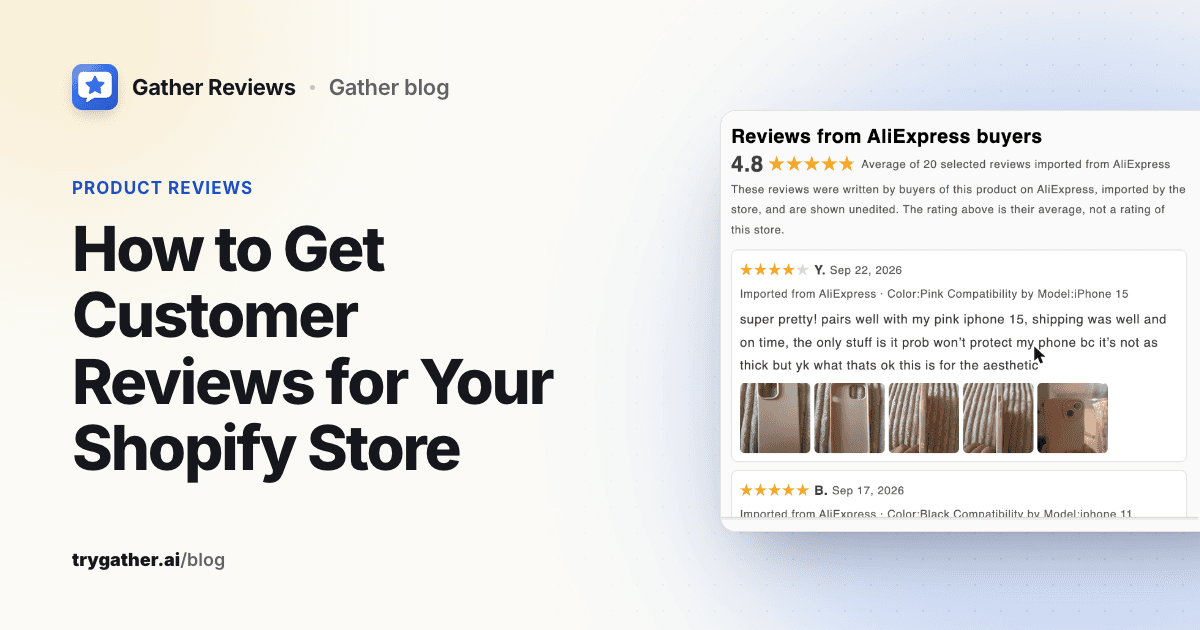
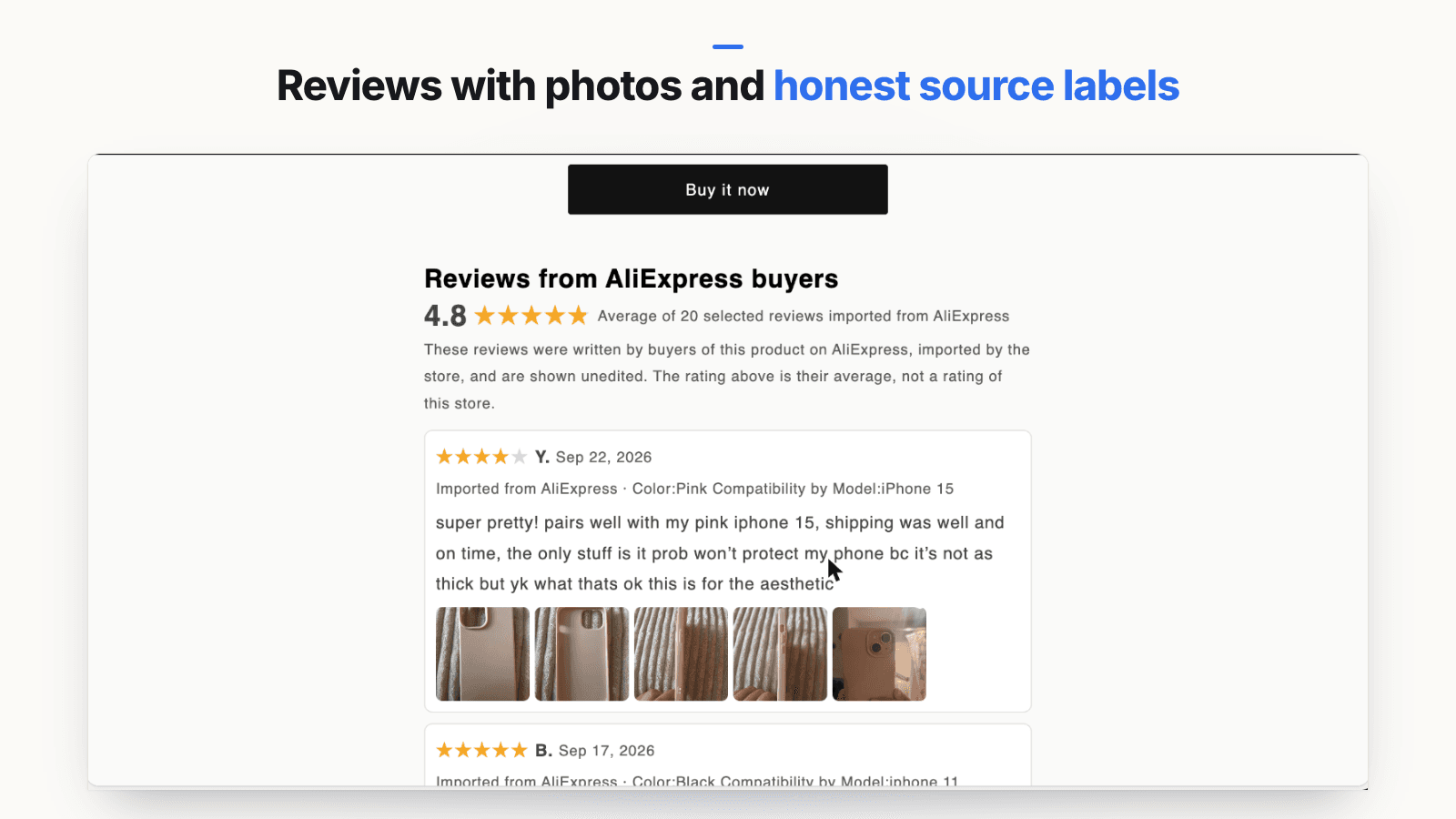
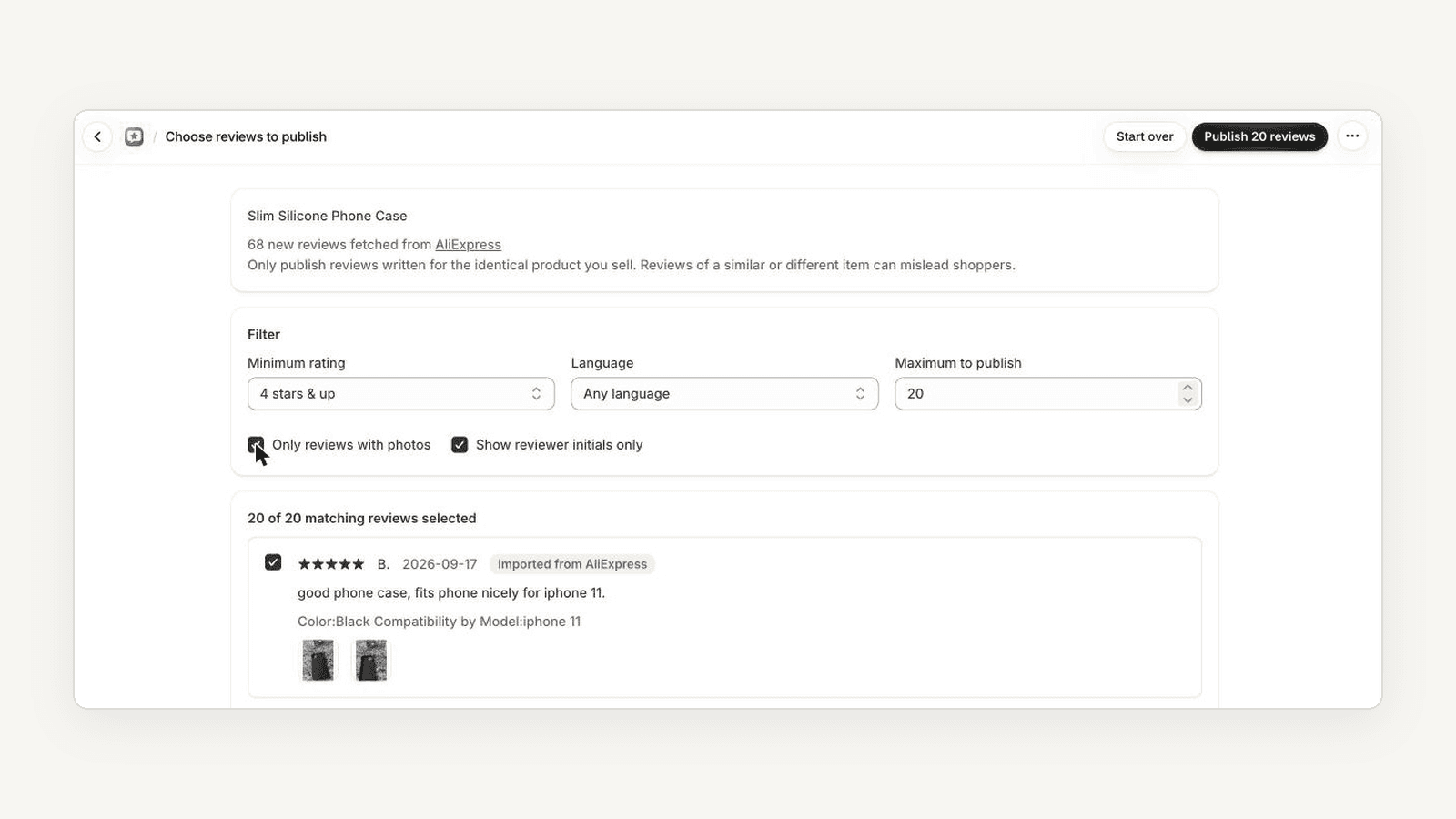
A request flow only produces reviews once orders are delivered and used, which for dropshipped products can take a month or more. If you sell the identical product you source from AliExpress or Amazon (same item, same listing, not a similar product or a different variant), one honest stopgap is to show reviews from that listing, unedited and clearly labeled with where they came from, in a section whose heading and rating line make clear it is not your store's own rating. As your own buyers' reviews arrive, they take over. The full how-to is in how to add reviews to Shopify, and social proof for a new Shopify store covers when to swap imported reviews for your own.
Several review apps, including Judge.me, Ryviu and Ali Reviews, have AliExpress importers. Our app, Gather Reviews, is new and built only for this bridge: you confirm the listing is the same product you sell, preview, and publish, and every review carries an "Imported from AliExpress" or "Imported from Amazon" label (Amazon imports are on paid plans). It does not send review requests, so you still need the flow above. When you import, leave the minimum rating at "All ratings" and only remove reviews that are empty, spam or about a different item. A star floor makes the imported set, and its average, unrepresentative of what buyers actually said.
Measuring what works: request-to-review rate by channel
You cannot improve what you do not count. The one number to track is the request-to-review rate: reviews received divided by requests sent, per channel and per timing rule.
Here is a worked example with made-up, rounded numbers, to show the calculation. They are illustrative only, not a benchmark:
| Channel (illustrative only) | Requests sent | Reviews received | Request-to-review rate | Reviews with photos |
|---|---|---|---|---|
| Email, 3 days after delivery | 500 | 25 | 5% | 5 |
| Email, 10 days after delivery | 500 | 40 | 8% | 10 |
| Insert card with QR code | 1,000 | 10 | 1% | 5 |
| Reminder email | 400 | 12 | 3% | 2 |
In this example the 10-day email beats the 3-day email, so the store would move the default to 10 days for that product type and test again. The insert card looks weak, but it costs little to print. Judge it on reviews per order, not in isolation.
A simple monthly routine:
- Export requests sent and reviews received from your review app, split by channel and timing rule.
- Calculate the request-to-review rate and the share of reviews with photos for each.
- Check unsubscribe and complaint counts for the reminder. If they rise, drop it.
- Change one variable at a time: timing, subject line or incentive, not all three.
- Read the one- and two-star reviews and log product or shipping fixes.
Frequently asked questions
How long after delivery should I ask for a review?
Wait until the buyer has had time to use the product. For things judged on sight, like a phone case or a print, three to five days after delivery is usually enough. For products that take weeks to judge, such as skincare, supplements or shoes, wait two to three weeks. Start the clock from the delivered date, not the order date.
Can I offer a discount code in exchange for a review?
Under the FTC's rule and guidance, an incentive must not be conditioned on the review being positive or negative, and it should be disclosed. The FTC also tells marketers not to ask for reviews only from customers they expect to be happy. The simplest way to stay on the right side of that is to offer the same incentive to every buyer you ask, whatever they are likely to say.
How many times should I follow up on a review request?
Send one request and at most one reminder about a week later, and only to buyers who have not already reviewed. Stop there. Each extra message risks unsubscribes and complaints, and buyers who ignored two asks are unlikely to answer a third.
Can I delete negative reviews from my Shopify store?
You can remove reviews that break a clear, published policy, such as spam, abuse, personal data or content unrelated to the product. You should not hide honest negative reviews. The FTC's rule bars presenting your displayed reviews as all or most of the reviews you received when you have suppressed some based on rating or negative sentiment.
Should I import supplier reviews instead of collecting my own?
Imported reviews are a starting point, not a replacement. If you sell the identical product you source, reviews from that listing, clearly labeled with where they came from, can help a brand-new product page. Your own buyers' reviews are still the goal, so start collecting them from your first order.